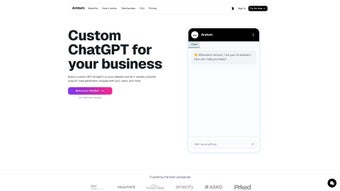

Download Arsturn AI – Custom Chatbot Builder, Free & Secure
Overview
Arsturn AI is a cloud‑hosted, no‑code platform that enables anyone—whether a solo entrepreneur, a growing e‑commerce store, or a large enterprise—to design, launch, and manage a custom ChatGPT‑powered chatbot in a matter of minutes. Built on top of OpenAI’s latest GPT‑4 model, the service interprets natural language queries and delivers human‑like responses without requiring developers to write a single line of code. The core philosophy behind Arsturn AI is three‑fold: simplify deployment, personalize every interaction, and drive measurable engagement.
Users start by selecting a personality tone (friendly, professional, witty, etc.), then shape conversation flows using a visual drag‑and‑drop editor, add reusable prompts for common questions, and finally embed a lightweight JavaScript widget on any website, WordPress site, Shopify store, or mobile app. Because the platform runs entirely in the browser and communicates with secure cloud endpoints, updates, security patches, and model improvements are rolled out automatically, guaranteeing that the chatbot always benefits from the newest AI capabilities. Whether you need a simple FAQ assistant, a lead‑capture form, or a full‑featured support desk, Arsturn AI promises a secure, scalable, and cost‑effective solution that can grow alongside your business.
Key Features & Benefits
- One‑Click Deployment: Generate an embeddable widget and add it to any page with a single script tag.
- GPT‑4 Powered Intelligence: Leverages OpenAI’s most advanced model for nuanced understanding and context‑aware replies.
- Drag‑and‑Drop Flow Builder: Visual interface for mapping conversation paths, conditional logic, and fallback messages.
- Custom Prompt Library: Store and reuse prompts for product details, policy explanations, or troubleshooting steps.
- Multi‑Channel Support: Deploy on websites, WordPress, Shopify, or integrate via API into iOS and Android apps.
- Real‑Time Analytics Dashboard: Monitor session counts, user satisfaction scores, and conversion metrics.
- End‑to‑End Encryption & GDPR Compliance: All data is encrypted in transit and at rest, with optional on‑premise storage.
- Automatic Model & Security Updates: No manual patches; the platform stays current with the latest AI advances.
- Generous Free Tier & Scalable Pricing: Start for free and upgrade as traffic and feature needs increase.
These capabilities translate into concrete business benefits. The visual flow builder eliminates the need for a development team, allowing marketing or support staff to iterate conversation scripts quickly based on real‑time analytics. The built‑in prompt library reduces repetitive work by letting you reuse proven phrasing across multiple bots or campaigns.
Because the widget is fully responsive, visitors on desktops, tablets, or smartphones receive a consistent experience, which helps maintain conversion rates across devices. Security‑first design ensures that personal data never leaves the encrypted tunnel, a critical requirement for regulated industries such as healthcare, finance, or education. Finally, the automatic update mechanism means your chatbot always benefits from the latest improvements in language understanding without any extra effort on your part.
In short, Arsturn AI fuses the raw power of GPT‑4 with an intuitive, no‑code environment that empowers any organization to deliver intelligent, on‑brand conversations at scale.
Installation & Usage Instructions
Step‑by‑Step Setup
- Navigate to Arsturn AI’s homepage and click “Get Started Free”.
- Create an account using your email address or a single‑sign‑on option (Google, Microsoft, Apple).
- Verify your email; you’ll be redirected to the main dashboard where you can click “Create New Bot”.
- Enter a bot name, select the primary language, and choose a default personality (e.g., friendly, formal, technical).
- Open the drag‑and‑drop flow builder. Add a welcome node, then branch out to FAQs, product lookup, or appointment scheduling. For each node, paste a custom prompt that guides the GPT‑4 response.
- Save the flow and press “Generate Embed Code”. A short JavaScript snippet appears below the preview window.
- Copy the snippet and paste it just before the closing
tag of your website’s HTML, or insert it via a WordPress “Custom HTML” widget, Shopify “Script” section, or any other CMS that accepts raw HTML. - Publish or refresh the page. The chatbot widget will appear in the lower‑right corner by default; you can reposition it later from the dashboard settings.
- Enter “Preview Mode” to test typical user queries, adjust prompts, and fine‑tune conditional logic until the conversation feels natural.
- Monitor live performance on the analytics tab, review metrics such as bounce rate, session duration, and conversion, and iterate on the flow based on real‑world data.
The entire onboarding process usually takes under five minutes for a basic bot. More sophisticated implementations—such as those that need to pull data from a CRM, trigger payment gateways, or call external APIs—can be achieved using Arsturn AI’s webhook feature. Webhooks allow you to send user intents and captured data to any endpoint, enabling bi‑directional integration without hosting your own AI infrastructure. Because the platform is fully SaaS, there is no client‑side installation beyond the widget script, and all updates are handled automatically on the server side. This eliminates the typical maintenance overhead associated with on‑premise chatbot solutions, letting you focus on conversation design rather than infrastructure management.
Conclusion, Pros & Cons, FAQ & Call to Action
Arsturn AI operates as a web‑based SaaS solution, meaning it is compatible with any modern browser (Chrome, Edge, Firefox, Safari) on Windows, macOS, Linux, Android, and iOS. The responsive widget automatically adapts to screen size, ensuring a seamless experience whether visitors are on a desktop workstation or a mobile phone.
Pros
- Zero‑code deployment – launch a chatbot in minutes.
- Powered by GPT‑4 for high‑quality, context‑aware responses.
- Generous free tier suitable for low‑traffic sites and testing.
- Fully responsive widget works across all operating systems and devices.
- Built‑in analytics help optimize conversion funnels and user satisfaction.
- GDPR‑compliant encryption protects user data by default.
- Automatic updates keep the AI model and security patches current.
Cons
- Advanced integrations (CRM, payment) require webhook configuration and basic JSON knowledge.
- Free plan imposes a monthly message limit (5,000 messages) which may require an upgrade for growing traffic.
- Widget design is limited to preset themes; deep visual customization is not yet available.
- Requires an active internet connection; offline operation is not supported.
- Higher‑tier pricing may be a barrier for very small businesses or hobby projects.
Overall Verdict: Arsturn AI delivers a compelling mix of ease‑of‑use, powerful language capabilities, and robust security. It is ideal for businesses that need a fast, reliable chatbot without allocating developer resources. While power users may desire deeper UI theming and native integrations, the platform’s roadmap promises expanded customization options in upcoming releases.
Frequently Asked Questions
Is Arsturn AI really free to use?
Yes. The free tier includes up to 5,000 messages per month, a single chatbot, and basic analytics. Larger volumes or premium features such as custom branding require a paid subscription.
Do I need programming skills to create a bot?
No. The drag‑and‑drop flow builder lets you design conversation paths visually. Only if you want to add webhooks for external integrations will you need to work with simple JSON payloads.
How secure is the data processed by the chatbot?
All communications are encrypted with TLS 1.3. The platform complies with GDPR, and enterprises can opt for on‑premise storage of conversation logs for additional compliance.
Can I integrate the chatbot with my existing CRM?
Absolutely. Using Arsturn AI’s webhook feature, you can send captured leads, support tickets, or user intents to popular CRMs such as HubSpot, Salesforce, or Zoho. The setup requires a small JSON configuration but no full‑stack development.
What browsers and devices are supported?
The widget works on all modern browsers—Chrome, Edge, Firefox, Safari—and adapts to desktops, tablets, and smartphones across Windows, macOS, Linux, Android, and iOS. No additional plugins are required.
Ready to Transform Your Site?
If you’re looking for a fast, secure, and scalable way to add AI‑driven conversations to your website, Arsturn AI offers exactly that. The free tier lowers the barrier to entry, while paid plans provide the depth you need as your traffic grows. Click the button below to start your free trial and see how a custom chatbot can boost engagement, capture leads, and reduce support tickets—all without writing a single line of code.



.png)



